-
application 내장 객체jsp 2023. 3. 27. 17:16
application : javax.servlet.ServletContext : 웹 서버 내 동일 애플리케이션 정보를 저장 및 처리
주로 전체 서블릿 객체에서 공유할 필요가 있는 값들을 설정할 수 있다.
(주로 전체 서블릿 객체에서 공유할 필요가 있는 값들을 설정할 수 있다)

<?xml version="1.0" encoding="UTF-8"?>
<web-app xmlns:xsi="http://www.w3.org/2001/XMLSchema-instance" xmlns="http://xmlns.jcp.org/xml/ns/javaee" xsi:schemaLocation="http://xmlns.jcp.org/xml/ns/javaee http://xmlns.jcp.org/xml/ns/javaee/web-app_4_0.xsd" id="WebApp_ID" version="4.0">
  <display-name>demo6</display-name>
  <welcome-file-list>
    <welcome-file>index.html</welcome-file>
    <welcome-file>index.jsp</welcome-file>
    <welcome-file>index.htm</welcome-file>
    <welcome-file>default.html</welcome-file>
    <welcome-file>default.jsp</welcome-file>
    <welcome-file>default.htm</welcome-file>
  </welcome-file-list>

  <!-- 서블릿 전체에서 공유할 수 있는 데이터를 선언 -->
  <context-param>
  	<param-name>imgDir</param-name>
  	<param-value>/upload/img</param-value>
  </context-param>

  <context-param>
  	<param-name>testServerIp</param-name>
  	<param-value>127.0.0.1</param-value>
  </context-param>

  <context-param>
  	<param-name>realServerIp</param-name>
  	<param-value>88.0.13.1</param-value>
  </context-param>


  <servlet>
  	<servlet-name>myServlet</servlet-name>
  	<servlet-class>com.tenco.MyServlet</servlet-class>
  	<!-- 초기 파리미터 설정 하기  -->
  	<init-param>
  		<param-name>adminId</param-name>
  		<param-value>tenco</param-value>
  	</init-param>
  	<init-param>
  		<param-name>adminPw</param-name>
  		<param-value>asd123</param-value>
  	</init-param>

  </servlet>

  <!-- URL mapping 하기   -->
  <servlet-mapping>
  	<servlet-name>myServlet</servlet-name>
  	<url-pattern>/myServlet</url-pattern>
  </servlet-mapping>

</web-app>
서블릿 전체에 쓸수 있도록 데이터를 선언하였다.
<%@ page language="java" contentType="text/html; charset=UTF-8"
    pageEncoding="UTF-8"%>
<!DOCTYPE html>
<html>
<head>
<meta charset="UTF-8">
<title>Insert title here</title>
</head>
<body>
<%
	String imgDir;
	String testServerIp;
	String realServerIp;

	imgDir = application.getInitParameter("imgDir");
	testServerIp = application.getInitParameter("testServerIp");
	realServerIp = application.getInitParameter("realServerIp");

%>

<p>imgDir : <%=imgDir %> </p>
<p>testServerIp : <%=testServerIp %> </p>
<p>realServerIp : <%=realServerIp %> </p>

</body>
</html>
jsp 파일에서 p태그안에 데이터들을 불러왔다.
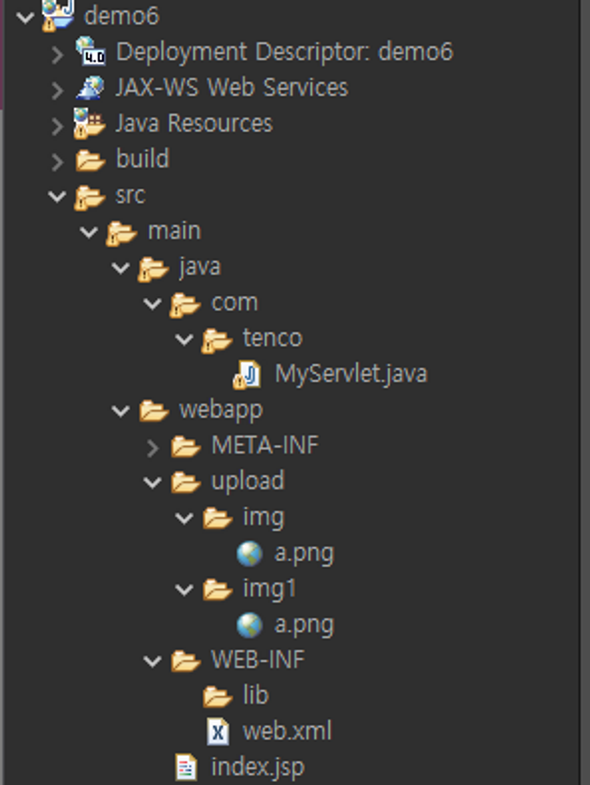
이미지가 없으면 안뜨기에 이미지를 넣어주었다.

이미지를 폴더안에 넣고 이미지 경로를 지정해 이미지가 뜨게 해준다.

'jsp' 카테고리의 다른 글
JSP 파일 업로드 (0) 2023.04.06 JSP WEB_INF + Filter (0) 2023.04.05 디자인 패턴 (0) 2023.03.27 JSP RequestDispatcher (0) 2023.03.27 config 내장객체 (0) 2023.03.27