-
JSP 파일 업로드jsp 2023. 4. 6. 11:52
파일 업로드 : 인크루드로 헤더랑 푸더에 만들고 바디부분에 form태그 안에 꾸며주고 서블릿에 만들어줘서
사진에 대한 정보를 받은후 내가 지정한 경로를 지정해줘서 이미지 데이터를 저장한다.
: HTTP 메세지 : body영역 : 텍스트 기반, 바이너리 기반
1.form 태그에 사용 방식 (enc..)
-멀티 파트 폼 (MIME TYPE 지정)
2.연산단위(WAS) 데이터 처리 @ MultiConfig.. 선언부트스트랩 이용방법
Try if Youtself를 클릭하면 html에서 어떻게 쓰는지 좀더 자세히 나오게 된다.
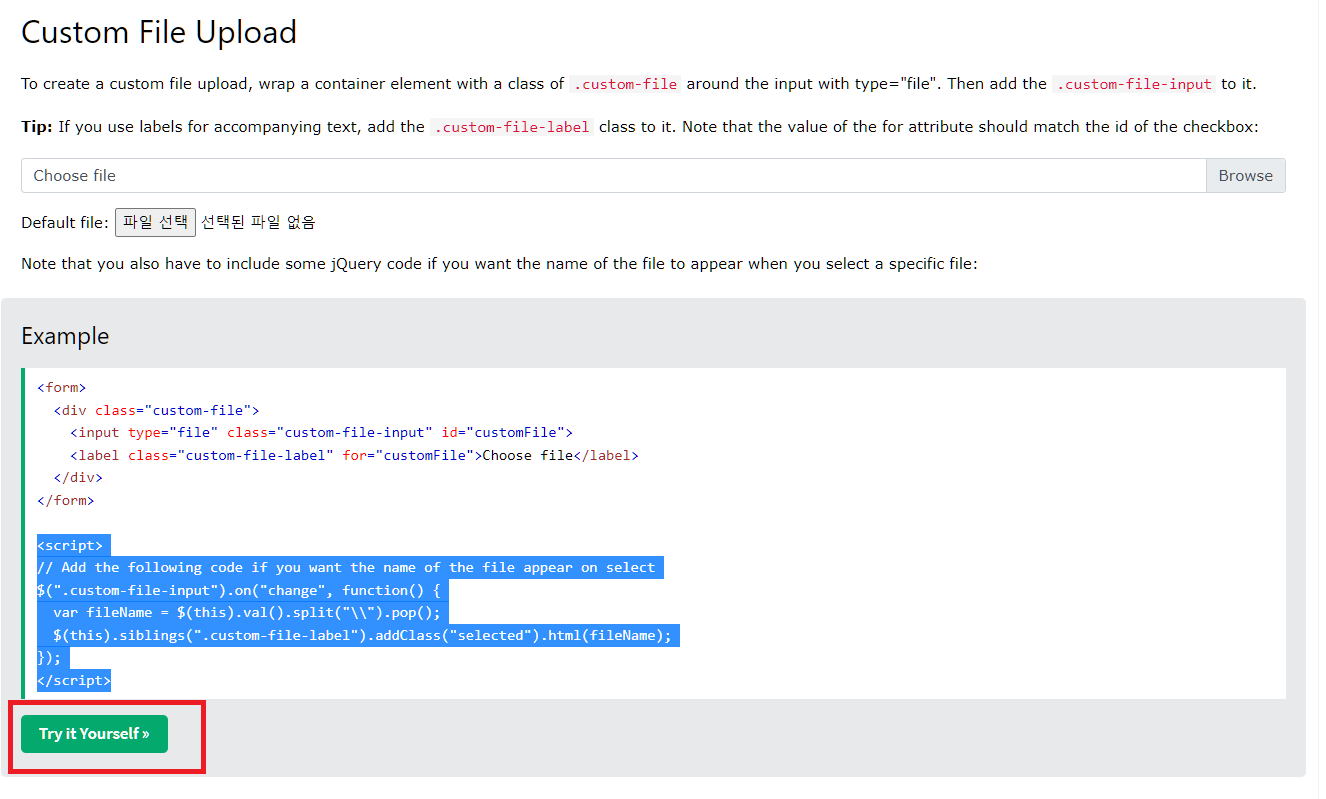
BS4 custom form - form 부트스트랩 디자인
ALL Classes 세세하게 꾸며주는 역할을 한다.

<%@ page language="java" contentType="text/html; charset=UTF-8"
    pageEncoding="UTF-8"%>
<!DOCTYPE html>
<html>
<head>
<meta charset="UTF-8">
<title>Insert title here</title>
<link rel="stylesheet" href="https://cdn.jsdelivr.net/npm/bootstrap@4.6.2/dist/css/bootstrap.min.css">
  <script src="https://cdn.jsdelivr.net/npm/jquery@3.6.3/dist/jquery.slim.min.js"></script>
  <script src="https://cdn.jsdelivr.net/npm/popper.js@1.16.1/dist/umd/popper.min.js"></script>
  <script src="https://cdn.jsdelivr.net/npm/bootstrap@4.6.2/dist/js/bootstrap.bundle.min.js"></script>
</head>
<body>
<div class="d-flex m-3">
<!-- 경로 찾을 때 : path - > URI 형식 기준으로 사용하자( 상대 , 절대 ) -->
	<!--  C:\Users\GGG\Desktop\이미지사진 -->
 <form action="upload" method="post" enctype="multipart/form-data">
    <div class="custom-file mb-3">
      <input type="file" class="custom-file-input" id="customFile"  name="file">
      <label class="custom-file-label" for="customFile">Choose file</label>
    </div>

    <div class="mt-3">
      <button type="submit" class="btn btn-primary">Submit</button>
    </div>
  </form>
</div>
	<script>
	// Add the following code if you want the name of the file appear on select
	// $ 제이쿼리의 시작 $ jquery. 이랑 같은 개념이다.
	//제이쿼리안에 엘리먼트 객체에 ".custom-file-input" 이 들어온거랑 같다.
	//val value의 약자
	// C:\Users\GGG\Desktop\이미지사진
	//.split(뒤에꺼를 다잘라서 파일명만 남음)
	//.siblings 안에 객체 형제중에 ".custom-file-label" 을 찾아준다.
	//.addClass ("selected") 동적인 클래스를 추가해준다.
	//.html(fileName) 요소안에 잘라서 남은 파일명을 추가해준다.
	$(".custom-file-input").on("change", function() {
  var fileName = $(this).val().split("\\").pop();
  $(this).siblings(".custom-file-label").addClass("selected").html(fileName);
	});
	</script>
</body>
</html>
package com.tenco.controller; import java.io.File; import java.io.FileInputStream; import java.io.FileOutputStream; import java.io.IOException; import java.io.InputStream; import java.io.OutputStream; import java.util.UUID; import javax.servlet.ServletException; import javax.servlet.annotation.MultipartConfig; import javax.servlet.annotation.WebServlet; import javax.servlet.http.HttpServlet; import javax.servlet.http.HttpServletRequest; import javax.servlet.http.HttpServletResponse; import javax.servlet.http.Part; @WebServlet("/upload") @MultipartConfig // 선언 하기 public class UploadController extends HttpServlet { private static final long serialVersionUID = 1L; public UploadController() { } protected void doGet(HttpServletRequest request, HttpServletResponse response) throws ServletException, IOException { } protected void doPost(HttpServletRequest request, HttpServletResponse response) throws ServletException, IOException { // 파일 업로드 처리 Part filePart = request.getPart("file"); System.out.println("컨텐츠 확인 : " +filePart.getContentType()); System.out.println("바이트 기준 : " +filePart.getSize()); System.out.println("파일 이름 : " +filePart.getSubmittedFileName()); //스트림 준비 InputStream fileContent = filePart.getInputStream(); //출력 스트림 준비하기 (우리 서버 컴퓨터에 출력 할 예정) OutputStream outputStream = null; try { // 사용자 파일명 중복 방지 UUID uuid = UUID.randomUUID(); String fileName = uuid + "_" + filePart.getSubmittedFileName(); // 폴더를 코드상으로 직접 생성해보기 : 2단계 String saveDirectory = "C:/demo12"; File dir = new File(saveDirectory); //먼저 검사하는거 // 파일이 하나라도 없으면 if (!dir.exists()) { dir.mkdirs(); } //미리 폴더를 만들어주자 : 1단계 File file = new File("C:/demo12/",fileName); //heap 메모리에 fileName을 선언했을뿐이다. //출력 스트림 사용 outputStream = new FileOutputStream(file); byte[] buffer = new byte[1024]; int lenth; while( (lenth = fileContent.read()) != -1 ) { // 1024 크기 바이트 읽었음 // 0번째부터 마지막 까지 읽어라 // 만약에 1030이면 나머지 6만큼 돈다. outputStream.write(buffer, 0, lenth); } // 파일 생성 완료 !! System.out.println("파일 생성 완료"); } catch (Exception e) { e.printStackTrace(); }finally { fileContent.close(); if (outputStream != null) { outputStream.flush(); outputStream.close(); } } response.sendRedirect("/demo12/home.jsp"); } }web.xml 파일에 home.jsp파일을 연결해주면 제일 먼저 열리는 파일이 home.jsp로 지정이 된다.
<?xml version="1.0" encoding="UTF-8"?>
<web-app xmlns:xsi="http://www.w3.org/2001/XMLSchema-instance" xmlns="http://xmlns.jcp.org/xml/ns/javaee" xsi:schemaLocation="http://xmlns.jcp.org/xml/ns/javaee http://xmlns.jcp.org/xml/ns/javaee/web-app_4_0.xsd" id="WebApp_ID" version="4.0">
  <display-name>demo12</display-name>
  <welcome-file-list>
    <welcome-file>home.jsp</welcome-file>
    <welcome-file>index.jsp</welcome-file>
    <welcome-file>index.htm</welcome-file>
    <welcome-file>default.html</welcome-file>
    <welcome-file>default.jsp</welcome-file>
    <welcome-file>default.htm</welcome-file>
  </welcome-file-list>
</web-app>
if (cmd.equals("upload")) { // saveFolder 이미지 폴더 경로가 맞아야 저장된다. String saveFolder = request.getSession().getServletContext().getRealPath("images"); String encType = "UTF-8"; int maxSize = 5 * 1024 * 1024; MultipartRequest multi = null; multi = new MultipartRequest(request, saveFolder, maxSize, encType, new DefaultFileRenamePolicy()); Enumeration<E> params = multi.getParameterNames(); Enumeration files = multi.getFileNames(); String userId = (String)params.nextElement(); int userId_value = Integer.parseInt(multi.getParameter(userId)); String content = (String) params.nextElement(); String content_value = multi.getParameter(content); String photo = (String)files.nextElement(); String filename = multi.getFilesystemName(photo); PhotoDTO dto = new PhotoDTO(); dto.setUserId(userId_value); dto.setPhotoImage(filename); dto.setContent(content_value); int result = photoDAO.save(dto); if (result == 0) { response.sendRedirect("border/writenull.jsp"); }else { response.sendRedirect("index2.jsp"); } }'jsp' 카테고리의 다른 글
JSP WEB_INF + Filter (0) 2023.04.05 디자인 패턴 (0) 2023.03.27 JSP RequestDispatcher (0) 2023.03.27 application 내장 객체 (0) 2023.03.27 config 내장객체 (0) 2023.03.27